Starting from RouterOS version v6.47, it is possible to use DNS over HTTPS (DoH) on MikroTik devices.
With DoH, DNS queries and responses are encrypted within the HTTPS protocol session and are sent over port 443 (just like the normal HTTPS web traffic), that hides the name resolution requests from an Internet Service Provider (ISP) and from anyone listening on intermediary networks.
Below you will find how to setup a CloudFlare’s DoH server on the MikroTik router from a command-line (terminal) or Winbox/Webfig.
Cool Tip: How to setup DNS servers on a MikroTik router! Read more →
CloudFlare’s DoH Server Setup on MikroTik
Use a terminal to download and import a DigiCert Global Root G2 certificate onto the MikroTik router in order to be able to verify CloudFlare’s HTTPS certificates:
[admin@MikroTik] > /tool fetch url=https://cacerts.digicert.com/DigiCertGlobalRootG2.crt.pem
[admin@MikroTik] > /certificate import file-name=DigiCertGlobalRootG2.crt.pem passphrase=""

Set the DoH resolver to CloudFlare:
[admin@MikroTik] > /ip dns set use-doh-server=https://1.1.1.1/dns-query verify-doh-cert=yes

Cool Tip: How to create a static DNS entry on a MikroTik router! Read more →
To verify that you are using the CloudFlare’s DoH, open this URL:
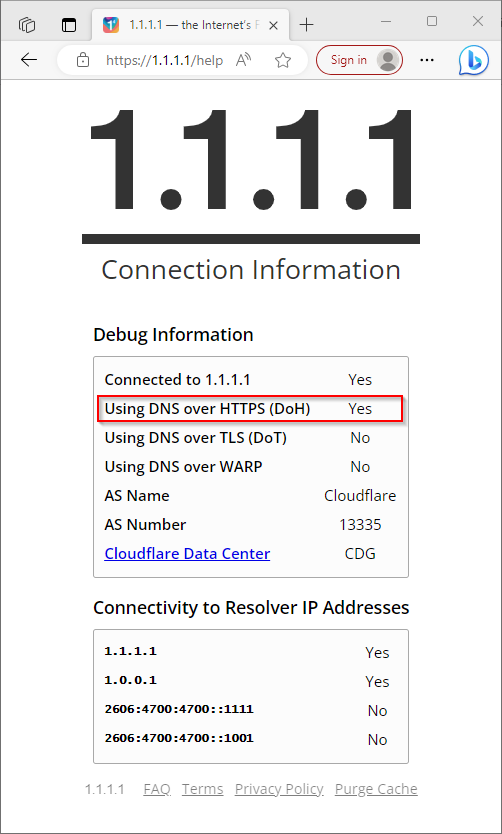
You can also use a DnsLeakTest.com to ensure that instead of your IPS’s DNS servers it shows the CloudFlare’s DNS servers:
