Some Internet service providers (ISPs) only allow devices with particular media access control (MAC) addresses to connect to the Internet.
If you’ve decided to replace your ISP’s router with a MikroTik, you may need to clone the MAC address of a wide area network (WAN) interface to the new device.
Below I will show how to change the MAC address of the MikroTik router through a command-line interface (CLI), WinBox and WebFig.
Cool Tip: How to connect to a new MikroTik router for the first time! Read more →
MikroTik – Change MAC Address
Command-Line Interface
List MikroTik interfaces and their MAC addresses:
[admin@MikroTik] > /interface print
- sample output -
Flags: R - RUNNING; S - SLAVE
Columns: NAME, TYPE, ACTUAL-MTU, L2MTU, MAX-L2MTU, MAC-ADDRESS
#    NAME    TYPE    ACTUAL-MTU  L2MTU  MAX-L2MTU  MAC-ADDRESS
0 R  ether1  ether         1500   1568       9214  AA:BB:CC:DD:EE:F0
1 RS ether2  ether         1500   1568       9214  AA:BB:CC:DD:EE:F1
2  S ether3  ether         1500   1568       9214  AA:BB:CC:DD:EE:F2
3  S ether4  ether         1500   1568       9214  AA:BB:CC:DD:EE:F3
4  S ether5  ether         1500   1568       9214  AA:BB:CC:DD:EE:F4
;;; defconf
5 R  bridge  bridge        1500   1568             AA:BB:CC:DD:EE:F1
6  S wifi1   wifi          1500                    AA:BB:CC:DD:EE:F5
7 RS wifi2   wifi          1500                    AA:BB:CC:DD:EE:F6
By default, the ether1 interface on the MikroTik routers is considered as the WAN port.
To change the interface’s MAC address, execute:
[admin@MikroTik] > /interface <interfaceType> set <interfaceName> mac-address=<newMacAddress>
- example -
[admin@MikroTik] > /interface ether set ether1 mac-address=AA:BB:CC:DD:EE:F8
To restore the interface’s default MAC address, execute:
[admin@MikroTik] > /interface <interfaceType> reset-mac-address <interfaceName>
- example -
[admin@MikroTik] > /interface ether reset-mac-address ether1
WinBox & WebFig
In the WebFig, the MAC address of the MikroTik’s WAN interface can be changed through the “Quick Set” configuration wizard page:
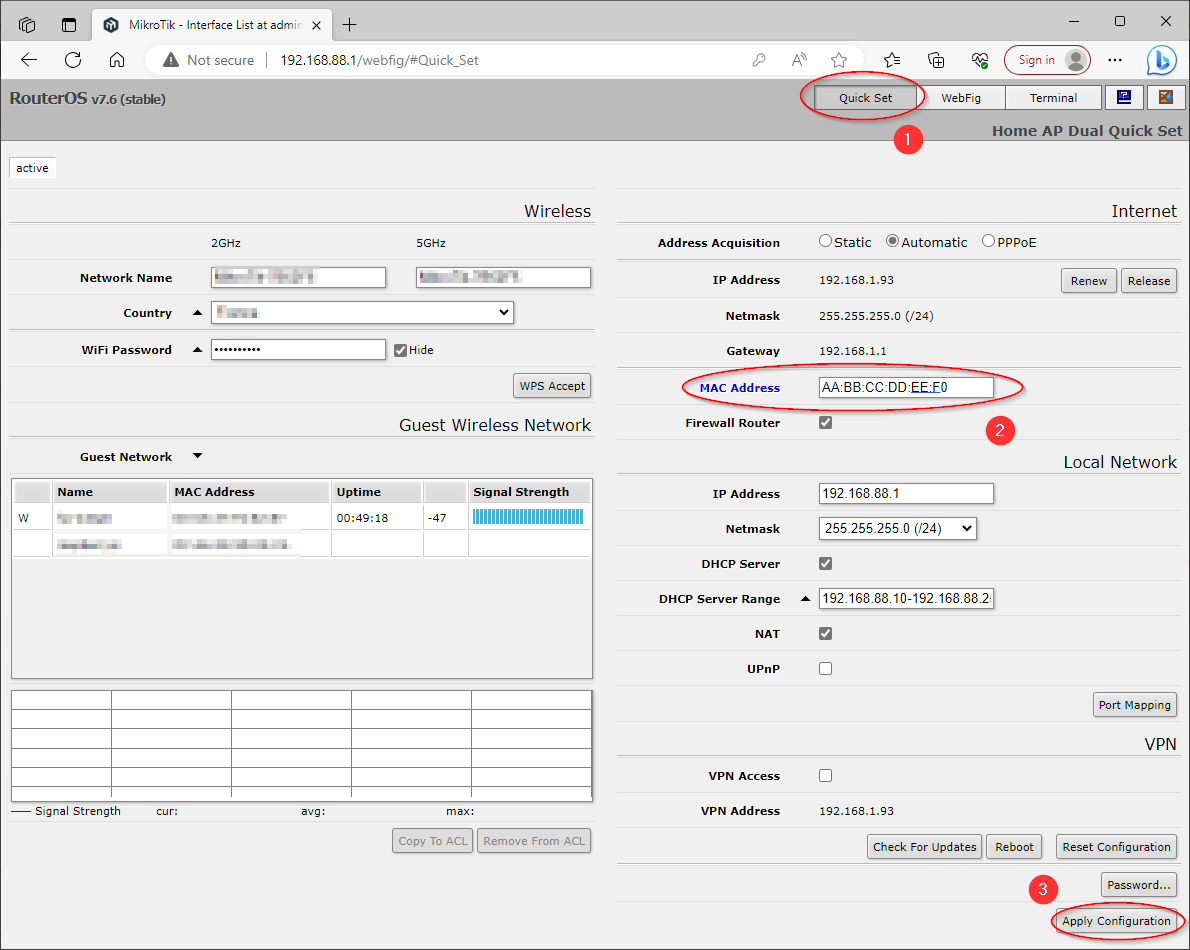
The same way the WAN’s MAC address can be set in the WinBox:
